One of the core characteristics of JavaScript in the browser is that the main execution environment is usually single-threaded.
That means if the main thread is busy doing expensive work, such as large text parsing, image processing, or heavy computation, the page can lag at the same time.
That is why browsers provide Web Worker.
Its purpose is simple:
- move some JavaScript work to a background thread
- keep the main thread focused on rendering and user interaction
- communicate through messages
1. Why Do We Need Web Worker?
If heavy work runs on the main thread:
- clicks may feel delayed
- scrolling can stutter
- input fields may freeze
- the page becomes unresponsive
Web Worker helps by moving that expensive work away from the UI thread.
2. What Is Web Worker?
You can think of a Web Worker as:
a background JavaScript runtime environment provided by the browser
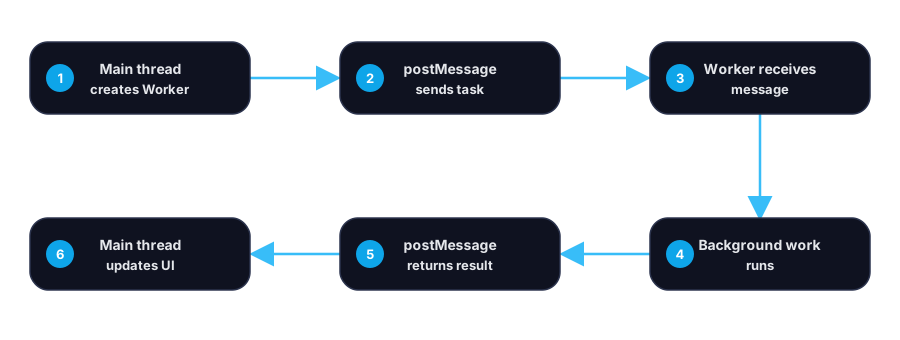
It runs separately from the main thread and communicates through postMessage.
3. Basic Usage
Create a worker in the main thread
const worker = new Worker("./worker.js");Send a message from the main thread
worker.postMessage({ type: "start", payload: 1000000 });Receive a message in the worker
self.onmessage = (event) => { const { payload } = event.data; const result = payload * 2; self.postMessage({ type: "done", result });};Receive a result in the main thread
worker.onmessage = (event) => { console.log(event.data.result);};4. A Simple Flow
5. What Web Worker Is Good For
Web Worker is a strong fit for:
- heavy calculations
- large data transformation
- parsing
- image or media processing
- tasks that should not block UI updates
6. What Web Worker Is Not Good For
a. Direct DOM manipulation
Workers cannot directly access the DOM.
b. Tiny, frequent tasks
If the task is too small, the messaging overhead may outweigh the benefit.
c. Logic that depends on page context
If the code relies heavily on browser UI state, it may not be a good worker candidate.
7. Worker vs Async
Web Worker is not just “more async”.
Normal async operations like fetch are already asynchronous, but their follow-up processing may still happen on the main thread.
Web Worker solves a different problem:
- async solves waiting
- worker solves main-thread occupation
8. Practical Example
A typical scenario:
- the user uploads a large file
- the file needs expensive parsing or transformation
- the result should not block the page
In that case, the main thread can pass raw data to a worker, and the worker sends processed results back.
9. Common Best Practices
a. Be careful with transferred data
Large message payloads can still be expensive.
b. Add a type field to messages
worker.postMessage({ type: "parse", payload });This makes message handling more maintainable.
c. Add a requestId
If multiple requests can run at once, use IDs to match responses.
d. Handle errors
Always think about failure cases:
worker.onerror = (error) => { console.error(error);};10. When Should You Consider Web Worker?
Consider it when:
- CPU-heavy work causes visible lag
- the page must stay interactive during processing
- expensive computation does not need direct DOM access
11. Summary
Web Worker is one of the most practical tools for keeping browser apps responsive during heavy work.
Its core value is not just asynchronous execution. Its real value is:
- protecting the main thread
- improving interaction smoothness
- separating UI work from computational work